 Airports & Sceneries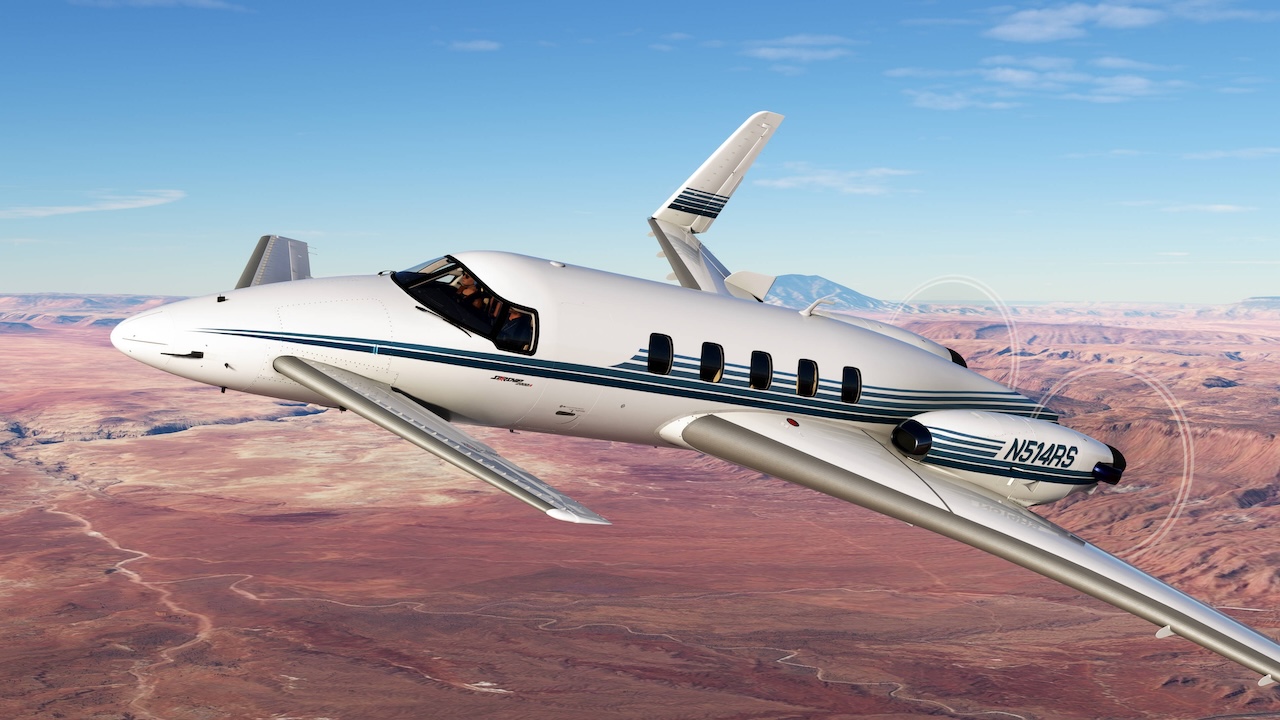
– New Features:
– Flight Plan Importing is now supported. Flight plans can be imported from the MSFS 2020 World Map (manually created or imported from a file). Given the uniqueness of Starship’s avionics, these flight plans must be reinterpreted for Starship; therefore, this feature is still considered “experimental”. For more information see the new “Importing a Flight Plan” section of this manual.
– NEW Magnetic Compass Effects including physics filtering and erratic behavior from onboard magnetic fields. See the “Magnetic Compass Effects” section of this manual for more information.
– Implemented ground comm functionality to power the left RTU, COM1 transceiver, and the pilot’s audio circuitry when the battery master switch is in the off position by pressing the “GND COM” push button on the electrical panel.
– Several push buttons and switches, such as the Battery Amps, Aft Fuel Quantity push buttons, and ground ice detector switch will now animate with their respective L:Vars. Also added “L:var_PropGovTestSwitch_Override” to animate the propeller governor test switch with external hardware.
– Added persistence to tablet payload unit switch between sessions.
– Added electrical circuit needed for some hardware to recognize the avionics state.
– Added persistent tablet option to disable auto-filling of payload data on CDU.
– The MFD cursor can now be used to select user-created waypoints from the map, and the MFD map will only display genuine user-created waypoints, as opposed to temporary ones created by importing flight plans.
– Only user-created waypoints will persist between sessions and be displayed on the inspect user waypoints screen, as opposed to temporary ones created by importing flight plans. This should eliminate the “INVALID USER WPT” message on CDU startup.
– The heading bug leading line (dashed magenta) will now appear whenever the selected heading is adjusted for a few seconds, the currently correct behavior in the real aircraft.
– Improved avionics fault detection update speed for MFD Avionics Status Screen display, and added “AVIONICS FAULT” message to CDU.
– Added headphone jack highlight to better alert users to the headphone isolation feature.
– Added L & R LIP HEAT LOW EICAS messages, for when the inertial separators are deployed, but bleed air temperatures are insufficient to heat the induction inlets.
– Windshield wipers now flutter when deployed at high indicated airspeeds, and also become jammed when airframe icing is moderate.
– When the wipers are deployed at high airspeed, the apparent wind will affect the resistance on the motor, slowing down the downward sweep. At high enough airspeeds, the wipers will not return to their parked position until airspeed is lowered.
– Bug Fixes:
– Changed CDU ADF frequency entry interpretation to allow for setting of frequencies with decimal components below 1,000 kHz.
– CDU messages that were previously acknowledged (white) would remain acknowledged, even when they were triggered subsequently again.
– Circuits on the hot battery bus would not respect battery discharge and failures under some circumstances.
– User waypoint delete function would not update the user waypoint CDU screen.
– Left and right radar tilt did not synchronize when in radar SYNC mode.
– In some circumstances, the localizer and glideslope would not capture when transitioning from autopilot modes other than NAV. This appears to be due to the native sense of localizer-based approach arming. A workaround has been implemented for a seamless experience when using the proper HTML events to control the autopilot.
– Under some circumstances, a runway waypoint could be replaced with the waypoint representing the opposite end of the runway during software back-end flight plan checks.
– Created a more robust check for duplicate waypoints to avoid erroneous WPT IS DUP IN FPLN CDU messages.
– PASS OXYGEN ON EICAS message would not trigger when the passenger oxygen system was deployed.
– LOC DISAGREE EICAS message now requires a localizer frequency to be tuned, as opposed to just a VOR frequency.
– MAIN & STABY DEICE FAIL messages will now extinguish during deicing tests, even if the test button is being held down, as per the procedures handbook.
– Windshield and cabin window icing effect restored on interior model.
– Fixed tiny hole in condition lever dust cover geometry.
– Fixed typo on toilet occupancy placard in aft of cabin.
– Restored airspeed indicator trend arc.
– Restored airspeed indicator blue rectangle (best single engine climb speed) adjustment with pressure altitude.
– Workaround for batteries that disconnect when recharged to exactly their full capacity due to a bug in the simulator.
After a prolonged development period beginning in 1979, the first Starship entered service in 1989. Only 50 airframes were delivered to customers, and six remain airworthy today. Despite being a notable failure, Starship was one of the most groundbreaking designs ever to see production. It was the first certified canard wing aircraft, the first business aircraft with an all-composite structure, the first certified twin pusher turboprop, the first general aviation aircraft with an all-glass cockpit, and it remains one of only three civilian turboprops with a service ceiling of 41,000 feet. More so than most rare or aging aircraft, Starship is a flying monument to innovation, ambition and the price paid for being too far ahead of one’s time.
Black Square’s Starship brings you one of the most technically advanced aircraft simulations for Microsoft Flight Simulator, with over 230 possible failures including new turbine engine failures, an accurate recreation of the one-of-a-kind Collins AMS-850 avionics suite and the most advanced pressurisation and cabin temperature simulations in MSFS. Avionics and instrument panel temperatures are simulated, and require proper management of cooling systems for continued operation.
Black Square’s new tablet interface lets you configure all options, manage payload, control failures, and monitor engines, electrical schematics and environmental control systems, all from within the simulator. The failure system allows for persistent wear, MTBF and scheduled failures for nearly every component in the aircraft. The Starship’s electrical system is the most accurate yet for Black Square, featuring the Starship’s implementation of the King Air triple-fed bus layout and back-up batteries for essential avionics. All systems in the Black Square Starship were created with reference to over 10,000 pages of operating handbooks, maintenance manuals, parts catalogues, and electrical schematics.
Users may choose whether to fly with modern GPS capabilities that have been added to the original AMS-850, with autopilot coupling to a GNS430 for modern approach, departure and arrival capabilities, or with only the navigational functionality of the original Starship, including VLF and Omega radio navigation. A 190-page manual provides instruction on all equipment and 62 in-game checklists with control/instrument highlighting are included for normal, abnormal and emergency procedures.
This simulation was created in partnership with real Starship owners to ensure the legacy of Starship and the operational knowledge lives on for a new generation of Starship admirers.
