 Airports & Sceneries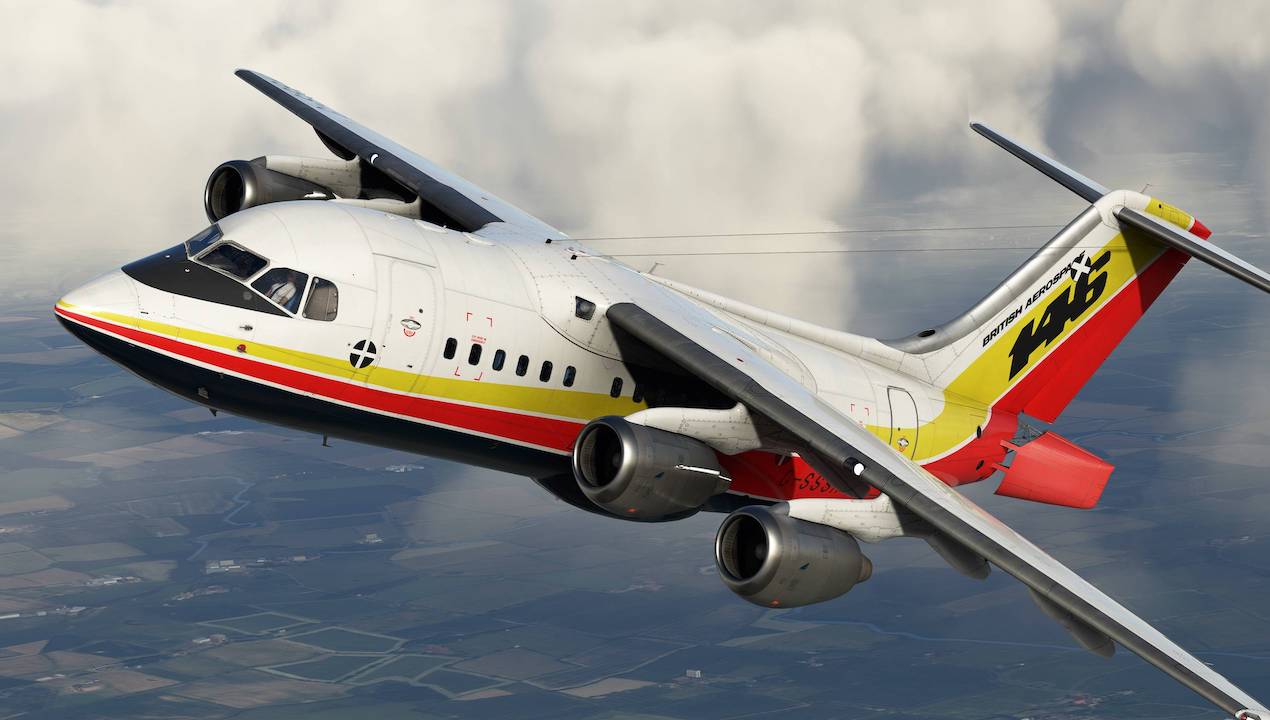
– Fixed unintentional dependency on the F28 Professional, which prevented the EFB ‘Home’ button, ‘Modern’ FMS and Weather Radar from functioning if the F28 Professional was not installed.
v0.2.4 / v2.4.0:
– Added additional model LODs for improved performance
– Added Just Flight v3 EFB:
– Added new, modern EFB tablet model
– Added ability to move EFB between two positions (via clickspots on top/bottom bezels)
– Redesigned EFB interface
– Added support for Navigraph En Route Charts
– Improved data entry logic on the Aircraft page
– Reorganised EFB Configuration Menu options
– Added confirmation popup when changing aircraft states
– Improved transition logic between JS/HTML and WASM EFB pages
– SimBrief import payload option now syncs the correct passenger number, cargo quantity and ZFW (updated SimBrief profiles for each 146 will be available)
– Updated red warnings on the Aircraft page when maximum weights have been exceeded
– Improved “Random Payload” logic
– Added light and dark themes to the aircraft page (based on selected EFB theme)
– Added new buttons/indicators for external power sources
– Added Ground Air (GND AIR) button to supply aircraft with air from an external source when on the ground
– Fixed minor Pushback menu artwork issue
– Added option to toggle between APU and GPU when selecting Turnaround state
– Fixed discrepancy between ZFW values before and after boarding
– Added ‘GATE TYPE’ option to the boarding simulation to toggle between jetway/stairs boarding method
– Added Jetway External Power logic – Default and GSX jetways, and GSX GPU, can now supply external power. Buttons on the EFB aircraft app allow for the selection of GPU or jetway power once available, or the overhead panel switch can be used as before.
– Added ‘AUTO CABIN MUSIC’ option to the EFB, allowing you to control whether the cabin crew switch the cabin music on/off.
– Added ‘KNOB ACCELERATION’ option to the EFB, allowing you to enable/disable knob rotation acceleration. Affects: NAV 1 CRS, NAV 2 CRS, HDG, ALT SEL, CABIN PRESS, ENG N1 bugs.
– Numerous other fixed and improvements to the EFB
– Added stair controls in forward galley for more realistic operation:
– Added Airstairs Accumulator (toggle via the EFB)
– Reworked airstairs controls based on logic from our RJ Professional
– Added STAIR RETRACTION switch to forward galley (used to extend/retract the airstairs)
– Added integral lights to the airstairs (controllable via the STAIR RETRACTION switch, toggleable via an option on the EFB)
– Added support for third-party liveries to include livery configuration files (see the Paintkit FAQ for more info)
– Added correct external equipment configurations (HF antenna, VHF3 aerial) and EFB KG/LB units for each 146 livery
– Added SimBrief OFP import functionality to UNS-1 FMS
– Added customised cabins to passenger liveries
– Added collision box to GPU
– Added drum ‘bounce’ animations to various drums in the cockpit (NAV CRS, ALT SEL, VHF COM 2, ALT BARO, DH)
– Added cockpit registration decal in cockpit (replacing the texture-based placard) allowing for greater clarity and customisability via the MSFS main menu
– Added oxygen depletion simulation
– Added paper effect to interactive paper charts and checklists
– Added extra cabin/wing camera views
– Added window heating elements to front and side cockpit windows
– Added ‘Ear’ symbols to either side of MCP CRS knobs
– Added volumetric effects to beacon, nav and strobe lights
– Added rain effects to cabin windows
– Added drift to navigation instruments – navigation instrument needles/indicators (ADI, HSI, RMI) will now exhibit drift based on signal strength
– Fixed aileron trim tab control rod animations
– Fixed minor bugs with Weather Radar
– Fixed minor missing cockpit emissive textures
– Fixed flap position indicator power source – now requires DC ESS power
– Fixed roll spoiler position indicators – now require DC ESS power
– Fixed reversed landing gear override switch logic
– Fixed engine fire handles illuminating during an overhead annunciator test
– Fixed rudder pedals animating in wrong direction when no hydraulic pressure is available
– Fixed minor bugs with speeds flipchart logic when the ‘FLIPCHART WT SYNC’ option on the EFB was toggle on/off multiple times
– Fixed 146-200 US Air registration typo in aircraft.cfg
– Fixed RT/INT switch on audio selector panels – is now a 3-position switch
– Fixed ENG 4 AIR switch incorrectly triggering the AIR SEL ON GRND caption
– Fixed MCP/glareshield button annunciators are now controlled by Captain’s FLT ANNUNS BRT/DIM control
– Fixed EFB configuration menu CABIN LIGHTS slider clickspot
– Fixed RMI texture issue
– Fixed reversed emissive texture on AUTO SPLR switch
– Fixed small gap in rear cockpit window
– Fixed minor emissive texture issue with fuel quantity indicator
– Fixed UNS-1 FMS button emissive texture
– Fixed airstairs slightly clipping forward galley crew seat
– Fixed minor exterior model gaps
– Fixed main landing gear hydraulic lines not animating with gear
– Fixed FD pitch bars not commanding 10 degrees nose up when starting a flight on the runway
– Fixed beacon light z-fighting
– Fixed missing GPU beacon emissive texture on 146-200
– Fixed EXT AC PWR AVAILABLE dimming functionality
– Fixed direction of port nav lights to prevent them illuminating the wing
– Fixed rain drops appearing on cockpit Entry lights
– Fixed various minor livery bugs
– Improved Electrical system:
– Extensively upgraded for greater accuracy
– Reworked battery contact and busbar logic
– Added Auto Cut-Out (ACO) logic
– Reworked external power logic
– Adjusted GPU start/stop timings for greater accuracy
– Reworked warning light/annunciator power source logic for greater accuracy
– Reworked ground service bus for greater simulated depth
– Improved passenger cabin electrical sources
– APU/GPU now initiate at 100% when selecting the turnaround state
– Improved Air-conditioning system:
– Extensively reworked air-conditioning system
– Improved DUCT TEMP and CABIN TEMP relationship
– Improved temperature simulation that takes into account direct sunlight, door status, etc.
– Added ground air-conditioning simulation (via a button on the EFB aircraft page)
– Improvements to air-conditioning electrical power source logic for greater accuracy
– Improved Master Warning System (MWS):
– Fixed numerous MWS trigger conditions
– Improved Ground Op and dimming logic
– Fixed FLT REC OFF MWP caption not illuminating during an MWS test
– Improved APU system:
– Improved APU start/stop timings adjusted for greater accuracy
– Added APU RPM/TGT needle bounce when APU switch set to STOP (simulating an aircraft not fitted with the APU ECU mod)
– Improved APU electrical power sources for greater accuracy
– Increased APU fuel flow to closer match the real-world aircraft values
– Improved call/intercom system logic:
– Improved trigger conditions
– Cabin to cockpit calls now correctly play a single chime
– Improved pilot callouts/cabin crew callouts/announcements:
– Improved trigger conditions (most notably, flap callouts during approach now occur at more accurate, lower speeds)
– Added support for flap 18 callout after a flap 30 takeoff
– Improved cabin crew callouts triggers during taxi – “Cabin Is Secured” callout will now automatically trigger 5-8 minutes after the doors are closed, simulating the time it takes for a safety briefing and seat belt check. “Cabin Crew Seats For Take-off” logic remains the same, either triggered via the “CAB CALL” button on the overhead panel when the aircraft is in a take-off state, or automatically during the take-off run.
– Fixed “Arm Doors” and “Cabin Secured” callouts not triggering if ‘instant’ boarding was used
– Improved ASI bug logic
– Added dragging interaction to all speed bugs
– Added interaction logic between bugs
– Improved accuracy of bug positions that are set automatically from the speeds flipchart
– Improved Hydraulic system:
– Reworked PTU and hydraulic pressure depletion logic
– Increased rate of yellow and green system pressure increase
– AC pump is now powered by AC 1 busbar
– Improved DC pump simulation
– Improved PTU simulation
– Improved green system supply simulation
– Improved standby generator simulation
– Added hydraulic airstairs accumulator simulation
– Improved “LO PRESS” pressure annunciators logic
– Improved brake pressure accumulator discharge simulation and rate
– Improved brake temperature logic (brake cooling has been tuned to be closer to the real aircraft figures, both with and without brake fans operational)
– Improved Ice protection system:
– Improved Q-pot pressure head – power is now affected by the standby generator and landing light conditions
– Improved intake low pressure and valve annunciator light simulation
– Improved Fuel system:
– Fixed fuel feed low annunciator power source
– Improved fuel tank pump logic, including added delay to annunciators when switching pumps on/off
– Fixed fuel tank gravity feed logic
– Improved fuel low pressure annunciators logic to no longer take account of throttle lever position (HP cocks)
– Improved Lighting system:
– Improved cockpit flood light colours – cockpit lighting is now warmer and more accurate to the real aircraft
– Improved annunciator/caption colours – yellow annunciators/captions now changed to a more orange colour to better match the real aircraft
– Added finer control added to cockpit lighting controls (more ‘steps’)
– Added cargo bay (forward/aft) lighting
– Added Airstairs lighting (controlled via the STAIR RETRACTION switch, togglable via an option on the EFB)
– Added cockpit ‘bounce’ lighting for more realistic illumination of areas such as the glareshield and overhead
– Improved flight deck storm and emergency light logic
– Added HI and LO nav light intensity simulation
– Improved nav light electrical sources – each nav light on each wing now have separate power sources (28 volt AC ground service bus and ESS AC)
– Fixed navigation lights disappearing when moving the camera further from the aircraft
– Added fade in/out effect to all external incandescent lighting (landing, taxi, wing, turnoff and logo lights)
– Improved electrical power sources for all exterior lights (including addition of ground service busbar)
– Improved existing lighting values throughout the aircraft for better balance and accuracy to the real aircraft
– Improved panel states:
– Updated default lighting states based on aircraft state and time of day
– Updated autopilot altitude selector to now default to 10,000ft in ‘Ready for Takeoff’ and ‘Turnaround’ states
– Improved flight models:
– Updated maximum weights on all variants to FCOM ‘absolute’ weight standards
– Corrected maximum occupancy limit to 118 occupants (-200 and -300 variants are now correctly limited to 113 passengers each)
– Improved pitch stability in level flight
– Improved V/L mode tracking
– Improved configuration horn logic
– Improved WASM initialisation logic
– Increased refresh rate of VHF NAV 1 radio display
– Improved tooltips throughout aircraft
– Improved potable water refill logic
– Improved EFB pushback functionality
– Improved ‘No Smoking’ signs logic, AUTO position now correctly takes into account nose gear position
– Improved engine oil quantity, temperature and pressure simulation
– Improved resolution of text on glareshield/MCP for greater clarity
– Improvements to audio control panel volume logic
– Improved tiller and nose-wheel steering logic
– Improved lift spoiler and airbrake simulation, lift spoilers now more effective
– Improved flap baulk logic for greater accuracy
– Improved flap fault/inop and associated test logic
– Improved GPWS logic
– Improved Main ADI gyro logic, wobble added when applying powering to the ADI
– Improved Standby ADI gyro and caging logic, wobble added when caging the Standby ADI
– Improved failure simulation logic to improve performance (FPS)
– Improved engine start and ignition logic
– Improved 146-300 Flap Trim Compensation (FTC) – trim change rate reduced, and more accurately synchronised with the flap movement
– Improved landing/taxi light models to give rounder edges (higher poly)
– Improved ADI aircraft symbol and flight director bar colours and emissive added
– Improved jetway auto attach/detach logic when boarding
– Improved default cockpit camera views
– Improved main altimeter and standby altimeter drum animations for greater accuracy
– Improved engine N1, TGT and FUEL USED drum animations for greater accuracy
– Improved brake accumulator pressure support for brake axis control assignments
– Improved engine inlet artwork to reduce UV distortion effect
– Improved slight texture differences between fuselage texture sheets
– Improved paper charts/checklist limit – now supports up to 15 interactive checklists and 20 charts
– Updated UNS-1 FMS default nav database to AIRAC 2401
– Updated paintkit (available via support page)
– Updated Operations Manual
– Updated EFB Manuals
– Updated UNS-1 FMS Operations Manual
Just Flight are excited to bring you the 146 ‘Whisper Jet’ – featuring the 100, 200 and 300 series of this classic British airliner. The design process of what was to become the 146-100 began under Hawker Siddeley in 1973, when the iconic high T-tail, short undercarriage, four engines and distinctive airbrake were chosen to produce a regional airliner with short-field performance and quiet operation. The 146-100 first flew in 1981, followed by the stretched 200 series in 1982 and the 300 series in 1988.
The Royal Air Force purchased three 146-100s in 1986 and these were operated by The Queen’s Flight, designated the CC.Mk2 ‘Statesman’ and equipped with VIP cabins. The aircraft were used to transport the British royal family and senior members of the UK military and government.
The 146 was also popular with cargo operators due to its excellent capacity and low engine noise, allowing for night flights into city airports. Two cargo variants were developed: the convertible passenger and freight variant (QC) and the freight-only Quiet Trader (QT). The Royal Air Force also operated two 200QC aircraft, designated the C.Mk3.
Eight variants of the 146 are included in this product – the 100 to 300 passenger variants, the 200QC and QT, 300 QT, RAF CC.Mk2 ‘Statesman’ and C.Mk3 – offering a wide variety of configurations, ranges and flight operations across the globe.
The exterior models are stunningly detailed, featuring 8K and 4K textures for incredible clarity and the latest Physical Based Rendering (PBR) material technology to produce realistic metallic, plastic and glass surfaces. Realistic animations include trailing-edge flap mechanisms, spoilers, large tail-mounted airbrake and all passenger and cargo doors.
The Captain and First Officer positions in the cockpit are modelled with hundreds of functional switches, knobs and controls. The aircraft features complex custom-coded systems based on real-world FCOMs, including hydraulic, electrical, fuel and pressurisation, and the cockpit is also fitted with a functional Thrust Management System (TMS) and comprehensive navigation equipment which includes an FMS.
The aircraft are brought to life with immersive dynamic lighting and 3D Wwise sounds, with unique flight dynamics for each variant and custom effects from condensation and contrails to realistic exterior lighting.
The 146 was flown all around the world and over 30 airline liveries from the UK, USA, Europe and Australia are included, bringing you many iconic airlines and paint schemes.
