 Airports & Sceneries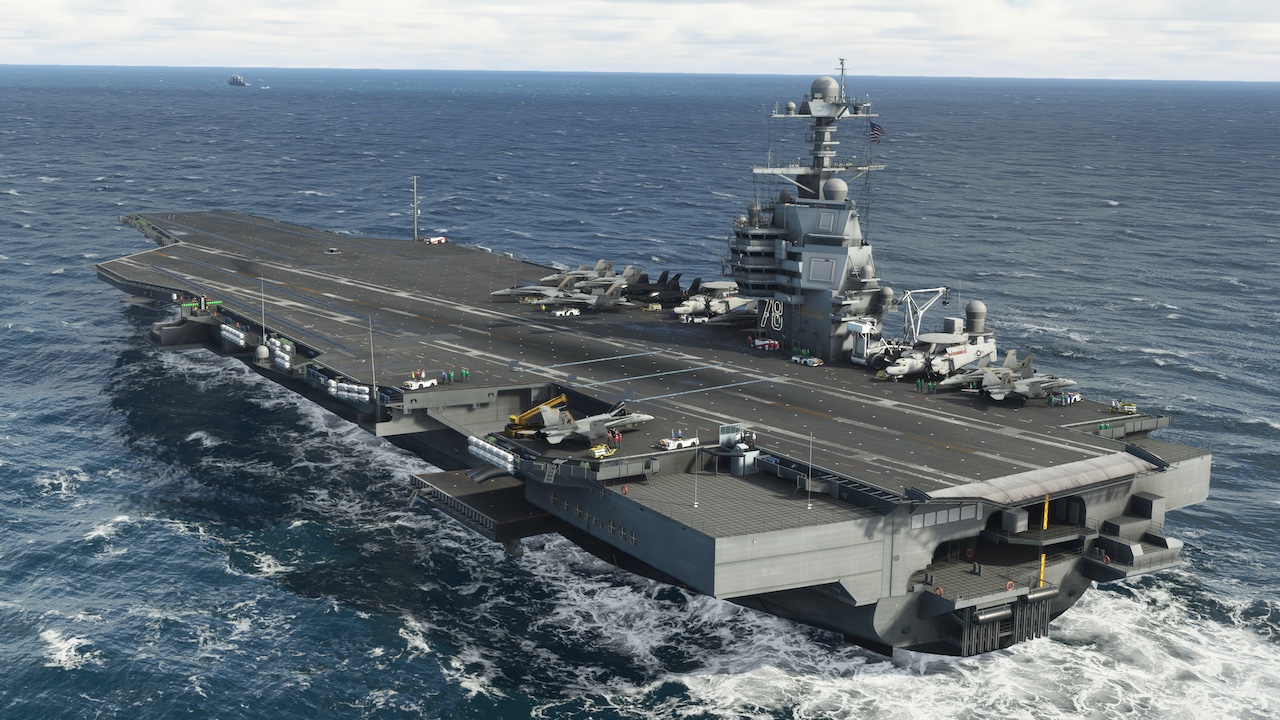
– [ADDED]: Toolbar panel: “Hide hangar, objects, rafts and tanks” setting hides the hangar interior, life rafts and water tanks.
– [ADDED]: Toolbar panel: “Hide deck vehicles” setting hides deck tugs, tractors, fire trucks, cranes and carts.
– [ADDED]: Toolbar panel: “Hide non-catapult crew” setting hides the ambient deck and hangar crew while catapult crews and taxi directors keep working.
– [ADDED]: Toolbar panel: “Hide parked aircraft” setting hides the parked deck, elevator and hangar aircraft.
– [ADDED]: Toolbar panel: “Turn off bridge / island lights” setting; deck, navigation and approach lights stay on.
– [ADDED]: Catapults: Extra deck crew at each catapult
– [IMPROVED]: Performance: CVN-69 and CVN-76 models cleaned of over 200,000 hidden duplicate triangles each, with no visual change.
– [IMPROVED]: Performance: The new hide settings let lower-end systems and Xbox remove hangar, vehicles, crew and parked aircraft for higher frame rates over the carriers.
– [FIXED]: Catapults: Launch no longer ends early when the aircraft lifts or bounces off the deck during the stroke; the catapult keeps accelerating until the aircraft is airborne above 100 knots, fixing weak launches in slower aircraft such as the A-1 Skyraider.
– [FIXED]: Catapults: Launch can no longer be triggered when the aircraft is away from the carrier.
– [FIXED]: Spawning at an airport near a carrier location (such as Key West) no longer teleports the aircraft onto the carrier deck.
– [FIXED]: Carrier panel: With two carriers close to each other (such as the Perth EC05 and Garden Island PC06 static carriers), landing information, catapult controls and teleports now follow the nearest carrier instead of switching to the other one.
Features:
• Beautifully Modeled Ships: four ships included on initial release, Ford Class CVN 78, Nimitz Class CVN 76, Arleigh Burke Destroyers and Ticonderoga Cruisers
• Roadmap: Additional US Historical Ships and French Carrier Charles de Gaulle planned for free future updates. Other ship packs may be released as expansions
• Moving and Static Ships: A total of 14 moving locations and 14 static (anchored) locations are included
• Miltech Simulations Supercarrier Pro Toolbar: In sim toolbar for full control of the carriers
• Universally compatible Arrestor Cables and Catapults: This product was developed in such a way that any aircraft, stock or 3rd party, can use the catapults and arrestor cables without any modification, and regardless if the aircraft has a tailhook or not
• Full Xbox Support: All features are fully supported on Xbox. Carriers have been optimized for excellent performance on Xbox
• FLOLS and LRLS: Functional Optical Landing Systems to safely guide your aircraft to the deck – follow “the Ball”
• Landing Signal Officer: Fully functional Landing Signal Officer, with functional audio callouts to guide the aircraft on landing and feedback scoring based on real naval operations
• Animated Crew, Jet Blast Deflectors and Elevators
• Fully Accessible Hangar (moving carriers only)
• Navaids: ILS and TACAN are available on static carriers
• Exclusive Discord Community to foster group flights, events and interaction among players. Invite is available on the Toolbar
• Carrier Comms: UNICOM and ATIS are available on static carriers. Carrier ATC Voice channels available over Discord for all locations
• Full Multiplayer Support: Both moving and static carriers are fully compatible over multiplayer
• Extensive Documentation covering equipment, systems and procedures available at: docs.miltechsimulations.com
• Teleport (Experimental Feature): teleport your aircraft to the carrier hangar, approach or deck using the teleport feature. Aircraft will change state according to where is teleported to
Worldwide Locations
Static locations are identified by ICAO code. Moving locations are identified with POIs on the World Map. A map view is available here: https://shorturl.at/gprt6
Ford Class CVN 78 Static:
• (FC01) San Diego, CA
• (FC02) Antalya, Türkiye
• (FC03) Sydney, Australia
• (FC04) Gulf of Guinea, Africa
• (FC05) Haifa, Israel
• (FC06) Singapore, Singapore
• (FC07) Norfolk, VA (CVN78 Homeport)
Ford Class CVN 78 Moving:
• Pensacola, FL
• Kingsville, TX
• Hawaii, HI
• Ionian Sea
• Gulf of Oman
• English Channel
• Eastern Caribbean
Nimitz Class CVN 76 Static:
• (ZC01) Whidbey Island, WA
• (ZC02) Da Nang, Vietnam
• (ZC03) Panama Canal, Panama
• (ZC04) West Palm Beach, FL
• (ZC05) San Juan, PR
• (ZC06) Long Island, NY
• (ZC07) San Diego, CA (CVN 76 Homeport)
Nimitz Class CVN 76 Moving:
• Oceana, VA
• Gulf of Alaska, AK
• Key West, FL
• Philippine Sea
• Baltic Sea
• Sea of Japan
• Balearic Sea
Important Note: Crash detection must be off at all times. Installing the freeware Top Gun Expansion is a requirement for this product to work correctly. Pausing the sim does not pause the movement of the carriers (moving carriers only).
